
Bridge Automation Gaps using RQConnect


RQConnect Overview
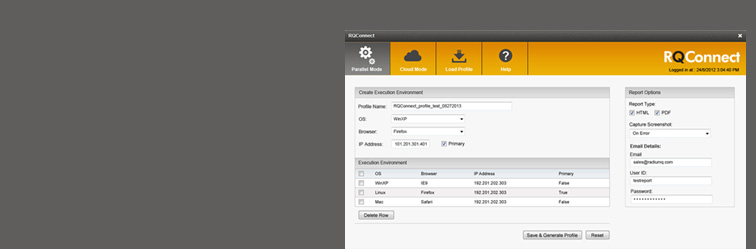
RQConnect is a plugin for HP’s QTP Functional Testing software, which enables QTP to execute test scripts on distinct browser/operating system combinations, either in parallel on a local system/remote system, or from the cloud. The RQConnect plugin is easy to configure through a simple, intuitive User Interface (UI), and offers the advantages of storable/reusable test profiles and multiple reporting options.
RQConnect’s Benefits:
Improve Automation Return-on-Investment: Consistency and efficiency of iterative activities can only be established through careful automation of these activities. With RQConnect, experience decreased automation regression cycle times!
Shortened Time-to-Market: while our QA team concentrates on core product innovation, your testing team can focus on the quality assurance activities, quickly performing test executions, resulting in faster delivery, increased customer satisfaction, and reduced development costs.
Shorter Turnaround Time: receive the results of tests immediately upon completion or as OS Notifications. See RQConnect’s Reporting options for more details! Click here
Schedule a Demo:
We would love to show you what RQConnect can do for you! Please use our contact form to request a demonstration. We will contact you by email to set it up!
Request a Quote:
Please use our contact form to request a custom quote. So that we can prepare you quote, be sure to tell us the operating system and application under test that you would like for us to base the quote on.
Key Features
RQConnect provides an out-of-the box solution to overcome the limitations of QTP, enabling QTP to execute scripts on different Operating Systems (Widows/Linux/MAC/Solaris) and standard browsers (IE8-IE10/Firefox/Chrome/Safari). RQConnect can execute test scripts in three modes:
Local Testing:
Execute scripts in any browser on a local system. RQConnect will test on either full-featured browsers or on headless browsers that lack a user interface.
Parallel Testing:
Parallel Mode allows you to execute scripts on multiple browsers in parallel, either on local or remote machines or from the cloud. With parallel testing, you don’t have to wait to make separate runs of your test scripts- run them at the same time on different O/S and browser combinations!
Cloud Testing:
Testing on the Cloud gives you the ability to test across 100-plus browser and O/S combinations-without having to set up or maintain those systems at all!
Profile Storage:
Store browser-and-O/S combination configurations for later use, saving time setting up test runs.
Reports
RQConnect offers great flexibility in receiving reports!
Reports are available native QTP files in Local, Cloud, and Parallel modes, with attached screenshots, on either “Error Occurrence” or Every Step” of the test script. Or, you can choose to have reports delivered as HTML or PDF files, with support to have reports auto-emailed to designated recipients previously configured in the profile.
During the test run, RQConnect can provide Balloon-Tip Reports, live status of test execution data, which displays in your System Tray as an OS Notification.
Licensing Model
Seat License:
A Seat License is bound to the computer's host name. After registration, each license can be used perpetually on the registered machine.
Floating User License:
A floating user license can be shared between different machines, but can only be used by one machine at a time.

Get our Newsletter
- SUPPORT & HELP
- Articles and Tutorials
- Product Updates
- FAQs
- Online Help


- RadiumQ, Inc.
- 6170 Research Road #223
- Frisco, TX 75033, USA
- +1(888) 504-4036
- sales@RadiumQ.com
- General Enquiries:
- info@RadiumQ.com
Copyright © 2018 RadiumQ All Rights Reserved.